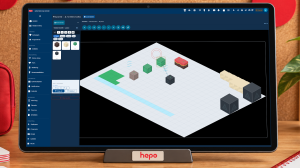
Simulation & Gamification
Explore connected information with FlowBox, rehearse changes in separate scenarios, and help people learn through interactive games within HEPO.

Choose a starting situation, adjust permitted inputs, and compare modeled or rehearsed alternatives with their assumptions and authority boundaries clear.
Scenario simulation is the part of HEPO's Simulation & Gamification offering where a team explores a proposed change through a suitable model or prepared rehearsal. Participants choose a starting situation, change permitted inputs, run or step through the experience, and inspect the result.
The output is a comparison tied to its inputs and assumptions. A process owner can use it to discuss a proposal and decide what needs verification before changing actual work. The scenario remains separate from the operational records it may use as its starting point.
The team agrees that something needs to change. The discussion becomes harder when everyone proposes a different answer: add capacity, admit less work, change a limit or move a deadline.
A scenario gives those proposals a common starting point. Choose the situation, adjust the permitted inputs and examine the model's response. People can discuss the difference between alternatives with their assumptions and consequences in view.
A useful scenario begins with an agreed question. For a delivery team, it might be: how could additional incoming work affect the unfinished workload over the next planning period?
The starting situation identifies the relevant quantities, the time period and the model used to explore them. It can use an authorized snapshot of operational information or a prepared example. The experience makes that origin clear.
This preparation gives the discussion a stable reference. Colleagues can see whether they disagree about an input, an assumption or the interpretation of an outcome.
The simulation exposes controls appropriate to its subject. In a Works scenario, those might include incoming work, service capacity, a work limit or an additional scope request. Labels, units and valid ranges help people understand what each change means.
View controls remain separate. Zooming, focusing or moving around the experience changes how you look at it. A scenario input changes the experiment. The distinction lets people inspect a result without accidentally altering the question under discussion.
An input also has a time meaning. A one-off admission of additional work differs from an increase in the rate of arriving work. A useful simulation makes that difference visible rather than leaving the group to infer it from an animation.
For an illustrative starting count of 14 unfinished items, admitting four additional items gives a count of 18 at that moment. What happens over the following days depends on the model's arrivals, completions, and rework assumptions. The same four items should not also be counted again as a separate arrival during that interval. This example explains the input's meaning; it is not a customer workload or a delivery forecast.
Run the scenario to its stated horizon, pause to inspect a result or advance it in steps. A group can stop at the moment where a difference becomes important and ask what contributed to it.
The result remains connected to the model and inputs that produced it. If the model includes a particular rework assumption, the explanation keeps that assumption available. If an important factor is absent, the group can identify it before using the outcome to support a decision.
This gives a facilitator a practical rhythm: make a proposal, examine the consequence, discuss it and try another declared alternative.
Begin from the same starting situation when you want to understand the effect of a change. Compare outcomes over a relevant period, with the changed inputs identified. For example, examine additional capacity separately from a reduction in incoming work before discussing a combined proposal.
Some changes may improve one modeled quantity while leaving another concern unresolved. The purpose of comparison is to make those differences discussable. A visually calmer scene alone does not establish a better business outcome; the quantities and their interpretation matter.
A recorded replay follows the supplied events. A prepared rehearsal can follow authored choices and outcomes. A calculating model produces results from its declared inputs and rules. These uses can look similar on screen, but they support different conclusions.
For example, changing a declared branch in a rehearsal lets the group inspect that alternative sequence. It does not establish that a live process would choose that branch from its business data. Similarly, a capacity model needs an explicit relationship between capacity and completed work; adding a visual object alone supplies no such relationship.
Process Analytics explains the separate context of a workflow dry run. The scenario experience described here supports a declared experiment rather than unrestricted execution of live business steps.
A scenario has its own state. Changing its inputs does not alter the underlying operational records, and resetting it does not reset the work your colleagues are doing.
If the team decides to act, it carries that decision into the ordinary HEPO process with the relevant authority and approvals. The simulation helps people prepare their judgment. The responsible person still decides what to do.
Understand observations, assumptions and results →
A reusable scenario reduces the work of constructing a fresh spreadsheet or commissioning another visual demonstration whenever the same type of question returns. Its familiar controls and explanations let the next session begin closer to the decision.
The model still needs appropriate data, domain knowledge and agreed assumptions. For an initial experience, choose a bounded question, identify who can validate those assumptions and decide what would make the comparison useful. That is a concrete starting point for shaping the simulation with your team.
See a delivery-pressure example → · Explore connected information with FlowBox →
Explore connected information with FlowBox, rehearse changes in separate scenarios, and help people learn through interactive games within HEPO.
Explore connected work in HEPO: focus on a concern, inspect relationships and source context, and carry a clearer question into scenario rehearsal.
Choose among Space, Graph, World, City, and Venue around the question, information, actions, and explanations your team needs.
Practise decisions through interactive activities, feedback, and discussion; connect games to development journeys without turning results into personal judgments.
Follow three illustrative HEPO sessions: delivery pressure, process delays, and shared learning, with preparation, participant actions, and useful next steps.
Interpret operational information, playback, scenarios, and exercise feedback using their sources, units, time, assumptions, and decision context.